







Take Your Presentation to the Next Level
Remember the days when high-tech presentations were limited to overhead projectors and transparency sheets? Today, technology has led to the creation of a wide variety of presentation tools such as document cameras.
Also known as visual presenters or Elmos (although Elmo is a specific brand name), document cameras allow educators, courtroom attorneys, or anyone who wants to give an effective presentation, the right tool to do so. Document cameras are extremely easy to use and require minimal set-up. Read below for more information on how to choose the perfect document camera option for you.
 How do you want your
presentation to be viewed?
How do you want your
presentation to be viewed?
Depending on how you want your presentation or lesson to be viewed, you'll need to consider output connection types when shopping for a document camera.
This is the most common display method. The projected image is usually large enough for a number of people to view it comfortably.
Good for small meeting rooms or
if there is no access to data projector. Switch from computer images to document cameras
with a touch of a button.
Depending on the size of the screen, good for small, medium, or larger meeting rooms or if no access to a data projector
VGA and/or HDMI outputs:
Document cameras with these outputs can be connected directly to a display such as a projector or monitor.
USB outputs:
Document cameras with USB outputs are usually the least expensive ones but must be connected to a computer.
VGA and/or HDMI with USB output:
These document cameras are usually the most expensive but are also the most popular because they offer users the most flexibility. Document cameras with a USB output usually come with software that enables image capture and recording to the computer. Some document cameras even include presentation software that enhances usability.
Document cameras cannot be connected directly to interactive boards, only to a computer or display device.
 Should My Document Camera
be Portable or Fixed?
Should My Document Camera
be Portable or Fixed?
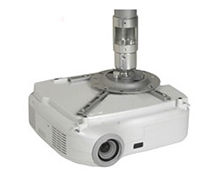
- Tend to be larger in size.
- Usually have a light box for x-rays, negatives, or slides.
- Great for using on a stage or in a classroom or library.
- Generally full-featured with a variety of options, such as more optical zoom.

Example of a Gooseneck (Flexible Neck) Document Camera:
Dukane 336B Document Camera
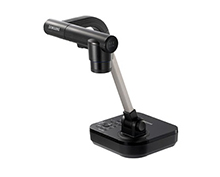
- Have a flexible neck (gooseneck), which can be folded easily for portability.
- Greater mobility than fixed installation.
- Available in basic to fully-featured models.
Example of a Rigid Arm Document Camera:
AVer M70 Portable Mechanical Arm Document Camera
 What kind of resolution
do I need?
What kind of resolution
do I need?
The resolution of the document camera you choose will determine the quality of the image that is shown.
Resolution is generally measured by:
- Number of lines.
- Number of pixels.
Document cameras are categorized by their resolution in the same manner as data projectors:
- SVGA
- XGA
- SXGA
- etc.
It is important to match your input resolution (document camera resolution) with your output resolution, whether you are using a data projector or a computer monitor to display your image.
While not directly related to resolution, frame rate has a great impact on the overall appearance of the image:
- Frame rate is the number of times the image refreshes per second and is often referred to as fps (frames per second).
- For example, a document camera that refreshes 30 frames per second will have much smoother image display than one that refreshes 15 frames per second. A document camera with 30 fps is desirable.
 What kind of
zoom do I need?
What kind of
zoom do I need?
There are three ways to make objects appear larger when using a document camera:
Bend the gooseneck so that the head is physically closer to the object:
- No extra cost.
- Easy to do.
Use the optical zoom built into the document camera (if available):
- No degradation in quality of image.
- Option may be more expensive than digital zoom.
Digital zoom resamples the image to make it appear larger:
- Slight degradation of quality.
- Less expensive than optical zoom.
 Do I need to worry about
lighting conditions?
Do I need to worry about
lighting conditions?
Many document cameras are equipped with lights that allow you to brighten the subject and dispel shadows. The type of lighting you need will depend on the room in which you plan on doing your presentation.
In a bright, well-lit room, lighting may not be needed; however, in a dark room or room with uneven lighting, sidelights can be used. A special type of light is a backlight, which allows you to use transparencies, X-rays or slides.
 Do I need
image storage?
Do I need
image storage?
A growing number of document cameras and visual presenters allow you to capture and store images for later use. Some more elaborate presenters use memory cards for storage, but most utilize internal memory that can later be transferred to a computer.
More Information
• Guide: Document Cameras in the Classroom
• Shop Document Cameras and Visual Presenters
• Shop Data Projectors



|

|

|
|

Contents of all material on these pages are ©2023 Camcor, Inc. All Rights Reserved.